
YouTube Create: Aplikasi Edit Video Resmi YouTube 2026 – Download APK Aman & Fitur AI Terbaru
0.187.01-release
Android OS

Description
YouTube Create adalah app edit video beta resmi dari YouTube untuk Shorts & video mudah dengan auto-captions, musik royalty-free, AI effects. Pelajari cara download aplikasi APK terbaru resmi dari Play Store, perbandingan vs CapCut/InShot, serta tips buat konten viral tanpa download game apk mod.
Table of Contents
YouTube Create: Edit Video YouTube Jadi Super Mudah dan Profesional Pakai HP Saja!
Bayangkan kamu lagi rekam video lucu di HP, langsung tambah musik keren, efek transisi mulus, subtitle otomatis, bahkan hapus noise latar tanpa ribet. Semua itu bisa dilakukan dalam hitungan menit tanpa software mahal! Itulah YouTube Create, aplikasi edit video resmi dari YouTube yang lagi beta tapi sudah bikin ribuan creator Indo ketagihan buat bikin Shorts atau video panjang.
Di 2026 ini, dengan tambahan fitur AI seperti generative video clips via Google Veo, app ini makin powerful buat pemula sampai pro. Cocok banget buat kamu yang sering upload ke YouTube tapi males buka laptop. Di artikel ini, kita bahas lengkap fitur terbaru, cara download APK aman, perbandingan dengan app lain, plus tips biar kontenmu langsung viral.
Apa Itu YouTube Create dan Fitur Unggulannya di 2026?
YouTube adalah app editing video gratis dari Google LLC, dirancang khusus buat creator YouTube. App ini fokus pada kemudahan: gabung video, foto, audio dalam satu tempat, tanpa perlu skill editing tinggi.
Fitur utama per Februari 2026 (masih beta, Android 8.0+ dengan minimal 4GB RAM):
- Easy Editing Tools — Trim, clip, crop, 40+ transitions, speed ramp (cepat/lambat).
- Next-Level Features — Auto-captions/subtitles satu tap (bahasa tertentu), audio cleanup hilangkan noise, background removal (cut out effect).
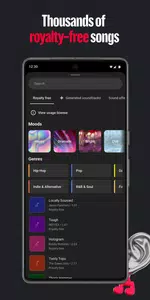
- Music & Audio — Ribuan lagu royalty-free + sound effects, beat matching sync clip ke musik, rekam voiceover langsung di app.
- Filters & Effects — Adjust saturation/brightness, filter mood, efek pop-up.
- Stickers & Fonts — Ratusan font animasi, stickers, GIF, emoji custom.
- Made to Share — Resize aspect ratio (portrait, landscape, square), upload langsung ke channel YouTube.
Update terbaru tambah AI: generate vertical clips, refine lighting/style pakai Veo 3 Fast, plus templates siap pakai. Menurut halaman resmi youtube.com/creators/youtube-create, app ini terus improve berdasarkan feedback creator. Rating Google Play sekitar 3.6 dari 19K+ review, dengan jutaan download.
Cara Download YouTube Create APK Terbaru Secara Aman
Banyak yang cari “download game apk” atau “download aplikasi apk” YouTube , tapi hindari situs pihak ketiga! Versi mod atau dari sumber abal-abal bisa bawa malware, curi akun Google, atau fitur nggak work.
Cara paling aman dan resmi:
- Buka Google Play Store di HP Android.
- Cari “YouTube” – developer Google LLC (package com.google.android.apps.youtube.producer).
- Download langsung: Google Play YouTube Create.
- Versi terbaru per Februari 2026 sekitar 0.187.01-release (ukuran ~130-150 MB).
Kalau nggak muncul di region-mu (karena beta terbatas), cek situs resmi atau APKMirror untuk versi resmi terverifikasi (tapi tetap prioritaskan Play Store untuk auto-update dan keamanan). App ini gratis, tanpa iklan mengganggu, dan update rutin tambah fitur AI.
Perbandingan YouTube Create vs Kompetitor Populer di 2026
YouTube sering dibandingkan dengan CapCut, InShot, dan VN Video Editor – app favorit creator Indo.
- Vs CapCut — CapCut lebih advance dengan template viral TikTok, AI effects kuat, dan export tanpa watermark (pro). Tapi YouTube unggul integrasi langsung ke YouTube, royalty-free music resmi, dan auto-captions akurat. CapCut kadang berat dan ada isu ban di beberapa negara.
- Vs InShot — InShot cepat untuk edit simpel (filter, text, ratio), user-friendly banget. YouTube lebih lengkap untuk YouTube-specific seperti upload langsung dan audio cleanup. InShot bagus buat beginner, tapi kurang AI generative.
- Vs VN Video Editor — VN terasa premium gratis, timeline pro, no watermark. Banyak creator pilih VN untuk vlog panjang. YouTube menang di musik library besar dan fitur YouTube-native seperti direct share.
Kesimpulan: Kalau kontenmu utama YouTube/Shorts, pilih YouTube karena seamless dan resmi. Kalau butuh template TikTok-style atau edit kompleks, CapCut/VN lebih fleksibel. Di review 2026, YouTube disebut “best for YouTube beginners” karena mudah dan terintegrasi.
Tips Maksimalkan YouTube Create untuk Konten Viral
Supaya hasil editmu makin pro:
- Gunakan beat matching untuk sync clip ke musik – bikin video lebih engaging.
- Aktifkan auto-captions + edit manual biar aksesibel dan SEO bagus.
- Pakai background removal untuk green screen effect tanpa studio.
- Rekam voiceover langsung – tambah personal touch tanpa app lain.
- Resize ke 9:16 untuk Shorts, upload langsung dari app ke channel.
- Ikuti update beta: cek Google Play atau blog.youtube untuk fitur AI baru seperti generate clips dari text/image.
- Hindari over-effect; fokus storytelling agar viewer betah nonton.
Dengan AI Veo integration, kamu bisa generate elemen video pendukung langsung di app – revolusioner buat creator solo.
Kesimpulan: YouTube Create Jadi Tools Wajib Buat Creator Indonesia 2026
YouTube membuktikan bahwa edit video berkualitas nggak perlu ribet atau mahal. Dengan fitur lengkap, AI canggih, dan integrasi sempurna ke YouTube, app ini bantu kamu bikin konten captivating tanpa keluar dari ekosistem Google.
Jadi, lupakan situs download APK mencurigakan atau versi mod. Langsung install dari Play Store, mulai project baru, dan upload ke channel-mu hari ini juga. Cocok buat pemula yang mau grow channel atau creator pro yang butuh tool cepat.
Sudah coba YouTube ? Share pengalaman edit favoritmu di komentar yuk! Semoga kontenmu makin viral dan subscriber naik pesat. Keep creating!
What's new
What's New in the Latest Version 0.187.01-release
Last updated on Feb 6, 2026
YouTube Create is currently in beta and is available on phones running Android 8.0 or later with at least 4GB of RAM. We will continue to add new features and improve YouTube Create over time.
Images



Download links
How to install YouTube Create: Aplikasi Edit Video Resmi YouTube 2026 – Download APK Aman & Fitur AI Terbaru APK?
1. Tap the downloaded YouTube Create: Aplikasi Edit Video Resmi YouTube 2026 – Download APK Aman & Fitur AI Terbaru APK file.
2. Touch install.
3. Follow the steps on the screen.